Open HTML and ZIP projects
Keep a single HTML file or a multi-file ZIP project as one reusable web page entry.
 HTML Pocket
HTML Pocket for iPhone and iPad
Import an HTML file or a ZIP web project, preview it with WebKit, and keep it in a local page library you can open again later.

What HTML Pocket is built for
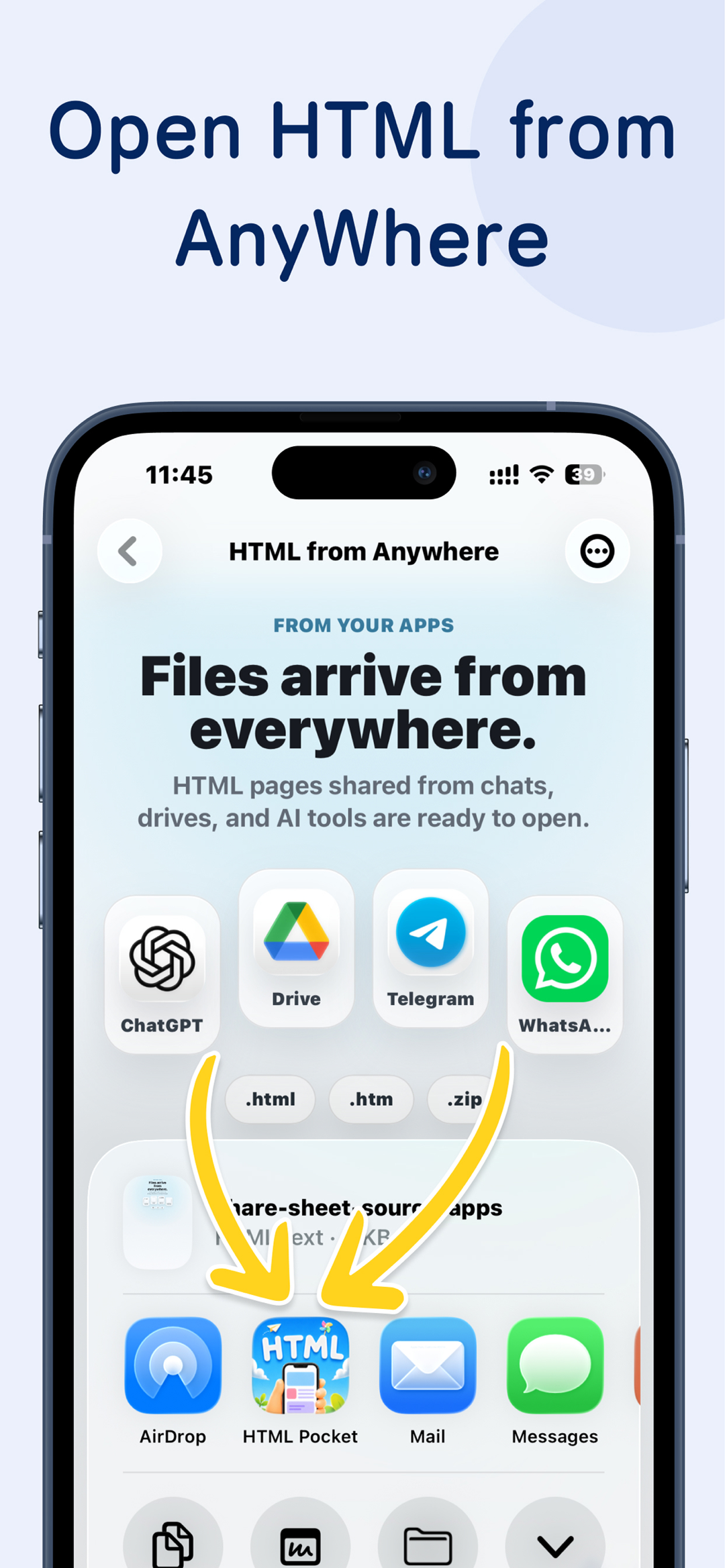
The app focuses on the moment after a file arrives from AI, AirDrop, Mail, Files, or your computer: open it locally, keep the project together, and make it easy to return.
Keep a single HTML file or a multi-file ZIP project as one reusable web page entry.

Send HTML, ZIP, or regular files generated on your computer straight into the page library.

After you choose a web page project, the widget shows its icon. Tap it to open that page directly.

Sync your page list, page files, and reading progress across your Apple devices.
Local page library
HTML Pocket does not turn your HTML into a public website. It imports the file or ZIP, keeps the project structure, renders it with WebKit, and records it in your local page list.
HTML Pocket
Agent Automation
Let Claude Code, Codex, Hermes, OpenClaw, or any other Agent manage this app for you. Agents can publish pages in batches, organize project names, set icons, and update your page list.
Widgets
After you choose a web page project, the widget shows its icon. Tap the widget to open that page directly.
iCloud Sync
Your page list, page files, and page progress can follow you across iPhone and iPad through iCloud.
Automatically sync your page library between iPhone and iPad.
App Store
iPhone 및 iPad용 HTML Pocket은 App Store에서 다운로드할 수 있습니다. Android 버전은 곧 제공됩니다.

A small report, a kid activity, a class demo, a mockup, a local tool, or a ZIP project can stay private on your device until you decide it needs a public URL.
질문
아이폰에서 HTML 파일을 여는 방법
메일, AirDrop, 메신저로 받은 HTML은 단순 미리보기보다 iPhone에서 로컬 페이지처럼 열고 싶은 경우가 많습니다.
iPhone 및 iPad의 HTML
 iPad에서 HTML을 열면 CSS와 JavaScript가 안 되는 이유
CSS, JavaScript, 이미지가 HTML과 떨어지면 iPad에서 스타일이나 동작이 빠진 상태로 보일 수 있습니다.
HTML, CSS, JavaScript
AI가 만든 HTML을 휴대폰에서 보는 방법
ChatGPT, Claude, Gemini가 만든 HTML은 공개 배포 전에 휴대폰에서 먼저 확인하려는 검색 의도가 많습니다.
AI 생성 HTML
아이폰에서 로컬 HTML과 JavaScript를 실행할 수 있나요?
자체 포함된 HTML과 JavaScript는 로컬에서 동작할 수 있지만 backend나 서버 경로가 필요하면 호스팅이 필요합니다.
로컬 HTML과 JavaScript
iPad에서 HTML을 열면 CSS와 JavaScript가 안 되는 이유
CSS, JavaScript, 이미지가 HTML과 떨어지면 iPad에서 스타일이나 동작이 빠진 상태로 보일 수 있습니다.
HTML, CSS, JavaScript
AI가 만든 HTML을 휴대폰에서 보는 방법
ChatGPT, Claude, Gemini가 만든 HTML은 공개 배포 전에 휴대폰에서 먼저 확인하려는 검색 의도가 많습니다.
AI 생성 HTML
아이폰에서 로컬 HTML과 JavaScript를 실행할 수 있나요?
자체 포함된 HTML과 JavaScript는 로컬에서 동작할 수 있지만 backend나 서버 경로가 필요하면 호스팅이 필요합니다.
로컬 HTML과 JavaScript
 iPad에서 ZIP 웹 프로젝트를 여는 방법
ZIP 웹 프로젝트는 HTML, CSS, scripts, assets를 함께 보관해 상대 경로가 깨질 가능성을 줄입니다.
ZIP 웹 프로젝트
iPad에서 ZIP 웹 프로젝트를 여는 방법
ZIP 웹 프로젝트는 HTML, CSS, scripts, assets를 함께 보관해 상대 경로가 깨질 가능성을 줄입니다.
ZIP 웹 프로젝트
다운로드
Available on the App Store for iPhone and iPad. Join the Android waiting list for Google Play updates.









 캘린더
캘린더
 사진
사진
 카메라
카메라
 메일
메일
 메모
메모
 미리 알림
미리 알림
 시계
시계
 뉴스
뉴스
 TV
TV
 게임
게임
 App Store
 지도
지도
 건강
건강
 지갑
지갑
 설정
설정
 HTML Pocket