Open HTML and ZIP projects
Keep a single HTML file or a multi-file ZIP project as one reusable web page entry.
 HTML Pocket
HTML Pocket for iPhone and iPad
Import an HTML file or a ZIP web project, preview it with WebKit, and keep it in a local page library you can open again later.

What HTML Pocket is built for
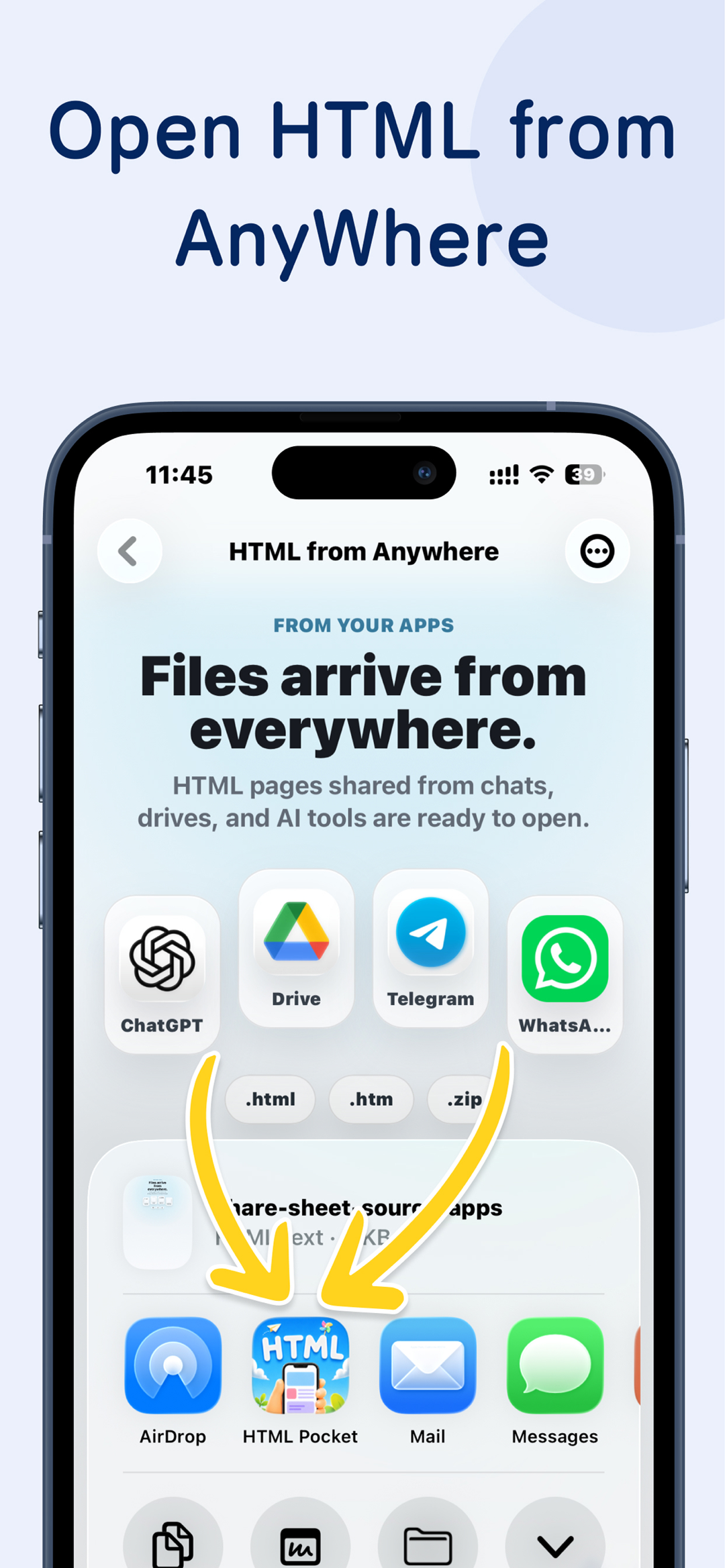
The app focuses on the moment after a file arrives from AI, AirDrop, Mail, Files, or your computer: open it locally, keep the project together, and make it easy to return.
Keep a single HTML file or a multi-file ZIP project as one reusable web page entry.

Send HTML, ZIP, or regular files generated on your computer straight into the page library.

After you choose a web page project, the widget shows its icon. Tap it to open that page directly.

Sync your page list, page files, and reading progress across your Apple devices.
Local page library
HTML Pocket does not turn your HTML into a public website. It imports the file or ZIP, keeps the project structure, renders it with WebKit, and records it in your local page list.
HTML Pocket
Agent Automation
Let Claude Code, Codex, Hermes, OpenClaw, or any other Agent manage this app for you. Agents can publish pages in batches, organize project names, set icons, and update your page list.
Widgets
After you choose a web page project, the widget shows its icon. Tap the widget to open that page directly.
iCloud Sync
Your page list, page files, and page progress can follow you across iPhone and iPad through iCloud.
Automatically sync your page library between iPhone and iPad.
App Store
Scarica HTML Pocket per iPhone e iPad su App Store. La versione Android arriverà presto.

A small report, a kid activity, a class demo, a mockup, a local tool, or a ZIP project can stay private on your device until you decide it needs a public URL.
Domande
Come aprire un file HTML su iPhone?
Quando un file HTML arriva da Mail, AirDrop o chat, l’esigenza è aprirlo come pagina locale su iPhone, non solo vederne l’anteprima.
HTML su iPhone e iPad
 Perché CSS e JavaScript non funzionano nel mio HTML su iPad?
Se CSS, JavaScript e immagini vengono separati dall’HTML, su iPad la pagina può apparire senza stile o senza interazione.
HTML, CSS e JavaScript
Come vedere HTML generato da IA sul telefono?
Dopo aver generato HTML con ChatGPT, Claude o Gemini, molti vogliono provarlo sul telefono prima di pubblicarlo.
HTML generato da IA
Posso eseguire HTML e JavaScript locali su iPhone?
HTML e JavaScript autocontenuti possono funzionare localmente; pagine con backend o rotte server richiedono comunque hosting.
HTML e JavaScript locali
Perché CSS e JavaScript non funzionano nel mio HTML su iPad?
Se CSS, JavaScript e immagini vengono separati dall’HTML, su iPad la pagina può apparire senza stile o senza interazione.
HTML, CSS e JavaScript
Come vedere HTML generato da IA sul telefono?
Dopo aver generato HTML con ChatGPT, Claude o Gemini, molti vogliono provarlo sul telefono prima di pubblicarlo.
HTML generato da IA
Posso eseguire HTML e JavaScript locali su iPhone?
HTML e JavaScript autocontenuti possono funzionare localmente; pagine con backend o rotte server richiedono comunque hosting.
HTML e JavaScript locali
 Come aprire un progetto web ZIP su iPad?
Un progetto web ZIP tiene insieme HTML, CSS, scripts e assets, mantenendo validi i percorsi relativi.
Progetti web ZIP
Come aprire un progetto web ZIP su iPad?
Un progetto web ZIP tiene insieme HTML, CSS, scripts e assets, mantenendo validi i percorsi relativi.
Progetti web ZIP
Scarica
Available on the App Store for iPhone and iPad. Join the Android waiting list for Google Play updates.









 Calendario
 Foto
Foto
 Fotocamera
 Mail
Mail
 Note
Note
 Promemoria
 Orologio
 News
News
 TV
TV
 Giochi
 App Store
 Mappe
Mappe
 Salute
 Wallet
 Impostazioni
 HTML Pocket